An Omarchy bar plugin

Every container, every host,
in one panel.

Dockarchy watches the Docker daemon on your laptop and the ones on your servers over SSH — Podman too — and puts them in the Omarchy bar: Compose projects, live stats, logs, shell, image updates and notifications, all without leaving the desktop.

$ omarchy plugin add https://github.com/XNinety9/dockarchy.git --enable
Free, WTFPL Runs as your user, no daemon of its own Remote hosts are plain docker contexts Reviewed on the Omarchy plugin marketplace
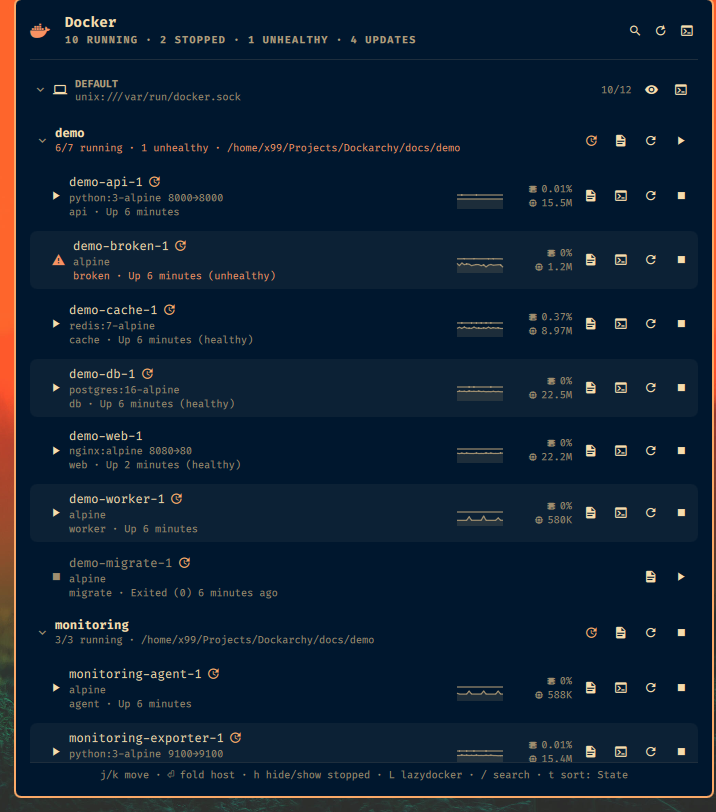
The Dockarchy panel: a host section with containers, their CPU and memory, and per-row actions
Two Compose projects and a standalone container on one host: stats with sparklines, update badges, the sticky shortcut footer.

Why another Docker widget?

Most bar widgets show docker ps for the machine they run on. Dockarchy was built for the other case: the containers that matter are on a server somewhere, and you still want them one click away.

Remote hosts, done right

A server is a Docker context with an ssh:// endpoint — nothing to install there. Dockarchy polls every host in parallel, and for remote ones it opens one SSH session per poll that runs docker ps and docker stats on the server. (Polling through docker --context would open a session per container and get you banned by fail2ban. Ask us how we know.)

▣ MAINSERV 27/28 ssh://you@mainserv ▸ jellyfin 8096→8096 ↑ ▸ caddy 80→80, 443→443 ▲ netdata Up 5 days (unhealthy)

Compose projects as first-class rows

Containers fold under their Compose project. A project row starts, stops or restarts every member in a single Docker call, tails compose logs, and pulls newer images then recreates the services. Fold state is remembered.

▾ pokecollect 3/3 running ▶ ■ ⟳ ▸ pokecollect-web web · Up 5 days ▸ pokecollect-api api · Up 5 days ▸ pokecollect-db db · Up 5 days ▸ arr 2/2 running

Knows when an image is stale

Every few hours it compares each running image's digest with what the registry serves for that tag — one anonymous HEAD per image, from the host itself. Containers with a newer image get a badge; p pulls and recreates.

27 running · 1 unhealthy · 3 updates ▸ prowlarr ↑ linuxserver/prowlarr ▸ jellyfin ↑ linuxserver/jellyfin ▸ netdata ↑ netdata/netdata

Everything in the panel

Mouse or keyboard, your call. The footer always shows the keys that apply to the selected row.

Search across hosts

/ then type. Every word must match name, image, project, state or status — unhealthy lists the sick ones everywhere.

Sparklines

CPU, memory, network, disk or PIDs — pick the metrics — over a configurable number of polls, with min/avg/max on hover.

Notifications

A container turns unhealthy or dies on its own, a host stops answering — you hear about it. Stops you asked for stay quiet. Recoveries optional.

Logs & shell

l tails logs, s drops you into bash (or sh) — in your terminal, over your own SSH config for remote hosts.

Clickable ports

8096→8096 under a name opens http://host:8096 in the browser, host taken from the context. o opens the first one.

Context menu

Right-click or m: ports, logs, shell, inspect, restart, copy name or ID, kill or remove — the destructive ones behind a confirmation.

Your bar, your label

A Python-style template next to the whale: {running}/{total} · {errors} err. Fold hosts, hide stopped containers, sort by state, name, CPU or memory.

Podman too 0.8

List Podman hosts — local or over SSH — next to your Docker contexts. Same rows, same actions, podman compose for projects.

Omarchy menu

bin/dockarchy-menu install adds a Docker submenu to the Omarchy menu, on request, and remove takes it back out.

A closer look

Straight from the bar, no mock-ups.

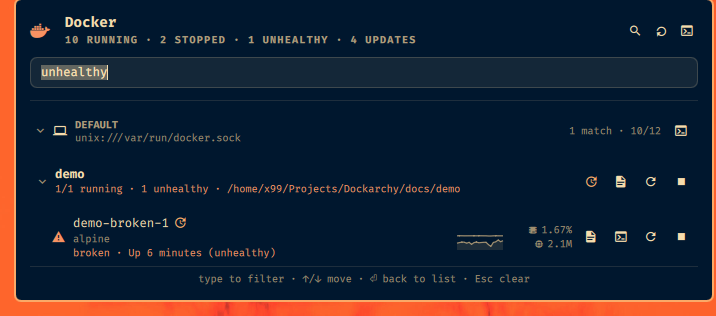
The panel filtered on 'unhealthy': one matching container
/ unhealthy — hosts without a match disappear.
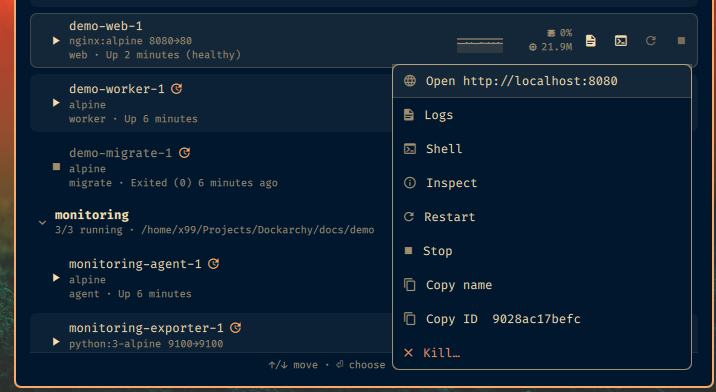
The context menu on a container: open port, logs, shell, inspect, restart, stop, copy, kill
Right-click or m: everything for one container, kill and remove behind a confirmation.
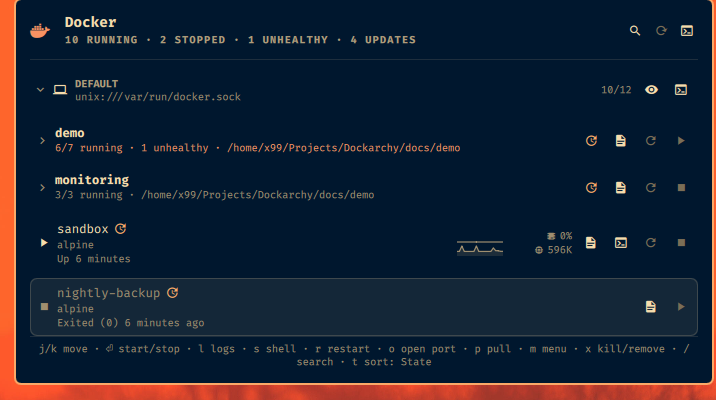
The panel with both Compose projects folded and two standalone containers
z folds every project; the state is remembered.
A desktop notification: sandbox stopped, Exited (137) The Omarchy bar with the Dockarchy label 10/12 · 4 upd · 1 err
A container died on its own → a notification with the theme-coloured whale. The bar label is a template: here {running}/{total} · {updates} upd · {errors} err.

Keyboard

Vim-flavoured, and the footer reminds you.

j kMove across projects and hosts
⏎Start / stop a container · fold a project or host
u dStart / stop — a container, or a whole project
rRestart
l →Logs (compose logs -f on a project)
sShell into the container
iInspect
oOpen the first published port
pPull the newer image and recreate
UCheck registries for newer images now
mContext menu
xKill (running) / remove (stopped), after confirming
cCopy the container name
hHide / show the host's stopped containers
zFold / unfold every project
tCycle sort: State → Name → CPU → Memory
/Search
RRefresh
Llazydocker for the selected host
EscClose

Settings

They live in the widget's entry in ~/.config/omarchy/shell.json. Change them in the shell's settings UI or with omarchy bar set x99.dockarchy <key> <value> — they apply live.

KeyDefaultWhat it does
contextsallDocker contexts to monitor.
podmanHostsnonePodman hosts: local and/or user@host[:port].
refreshIntervalSec15Poll interval, 5–3600 s.
timeoutSec10Per-host limit before it is marked unreachable.
showAlltrueInclude stopped containers.
showStatstrueCPU % and memory per running container (docker stats).
showSparklinestrueTrend lines next to the stats.
sparkMetricsCPU,MemoryWhich metrics: CPU, Memory, Network, Disk, PIDs.
sparkSamples20Polls a sparkline spans.
groupByProjecttrueFold containers under their Compose project.
sortByStateState, Name, CPU or Memory.
notificationsProblemsOff, Problems, or Problems and recoveries.
updateCheckHours6Hours between registry checks for newer images; 0 disables.
barFormat{running}Bar label template: {running} {stopped} {total} {unhealthy} {unreachable} {errors} {updates} {hosts}.
panelWidth / panelMaxHeight700 / 800Popup size; it grows with content up to the max, then scrolls.
alternateRowsfalseShade every other row.
runningAccentfalseTint running containers with the theme's accent colour.

Install

Omarchy 4.x. You need the docker CLI and jq (both in Omarchy's base) and access to the Docker socket as your user. No sudo or pkexec is required.

  1. Add the plugin from GitHub and enable it.
    omarchy plugin add https://github.com/XNinety9/dockarchy.git --enable
  2. Optional — add a server. Any host you can ssh into non-interactively works; add ControlMaster to your ~/.ssh/config for it so the one SSH session per poll is reused.
    docker context create mainserv --docker "host=ssh://you@mainserv"
  3. Optional — put it where you like on the bar, and pick a label.
    omarchy bar move x99.dockarchy --before omarchy.network
    omarchy bar set x99.dockarchy barFormat '{running}/{total} · {errors} err'
  4. To remove it later:
    omarchy plugin remove x99.dockarchy