Omarchy bar widget · C411 trackerWidget pour la barre d'Omarchy · tracker C411
Your C411 ratio, and where it's heading.
Ton ratio C411, et là où il va.
C411 Trend records your upload, download and ratio, charts them, and tells you when you will hit the next milestone at your current pace. Ask it about your own goals: "20 TB uploaded in 2 months", "ratio 5.00 in 8 weeks".
C411 Trend relève ton upload, ton download et ton ratio, en trace les courbes et te dit quand tu atteindras le prochain palier à ton rythme actuel. Interroge-le sur tes propres objectifs : « 20 To d'upload dans 2 mois », « ratio 5,00 dans 8 semaines ».
Forecasts & what-ifPrévisions et « et si »English & FrenchAnglais et françaisYour session stays localTa session reste localeWTFPL
Fictitious account, real widget.Compte fictif, widget réel.
Everything about your ratio, one click awayTout sur ton ratio, à un clic
A pill in the bar, a panel when you click it. No browser tab, no spreadsheet.
Une pastille dans la barre, un panneau quand tu cliques dessus. Pas d'onglet, pas de tableur.
History and trendHistorique et tendance
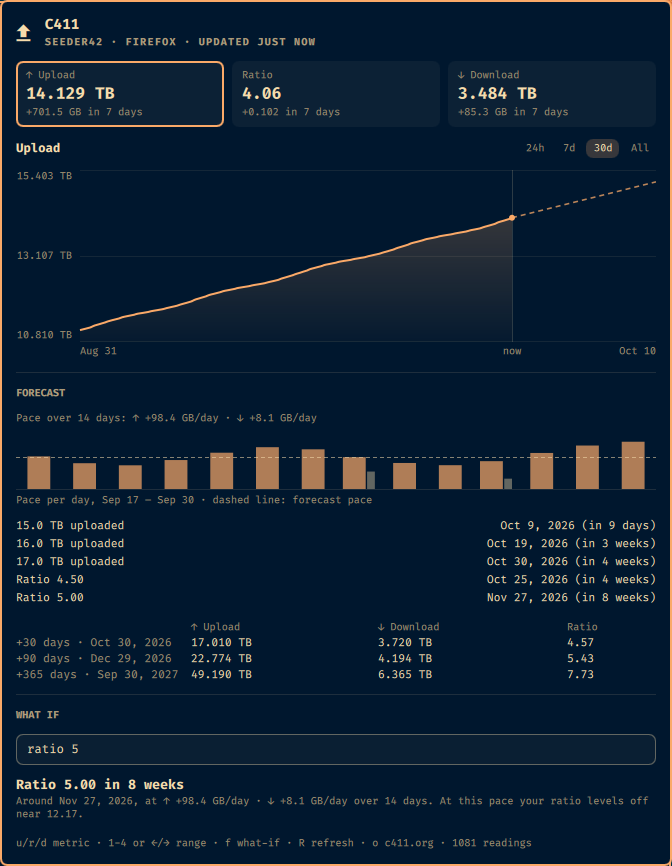
Upload, ratio and download tiles with their change over 7 days, and a chart over 24 h, 7 days, 30 days or everything, the trend dashed past "now".
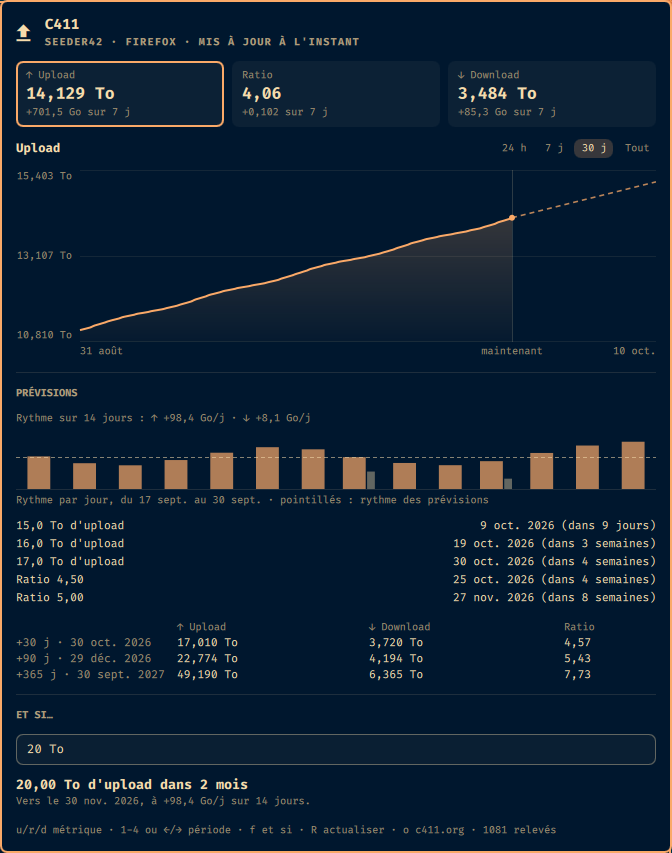
Cases upload, ratio et download avec leur évolution sur 7 jours, et une courbe sur 24 h, 7 j, 30 j ou tout l'historique, la tendance en pointillés après « maintenant ».
Forecasts that explain themselvesDes prévisions qui s'expliquent
Next round figures with their date, your own goals, projections at 30, 90 and 365 days. The ratio is derived from both paces, so it knows when a goal is out of reach.
Prochains paliers ronds avec leur date, tes objectifs, projections à 30, 90 et 365 jours. Le ratio est déduit des deux rythmes : il sait quand un objectif est hors d'atteinte.
Pace per dayRythme jour par jour
A bar per day, upload and download, with the forecast pace dashed across. Spot a slowing torrent before the average does. Hover a day for its figures.
Une barre par jour, upload et download, avec le rythme des prévisions en pointillés. Repère un torrent qui ralentit avant que la moyenne ne le montre. Survole un jour pour ses chiffres.
What ifEt si…
Type "20 TB", "ratio 5" or just "5" and read when you get there, at what pace, or why not.
Tape « 20 To », « ratio 5 » ou juste « 5 » et lis quand tu y arriveras, à quel rythme, ou pourquoi pas.
Your bar, your labelTa barre, ton texte
Compose the pill from 20 values: totals, pace, gains over 24 h / 7 / 30 days, time to your goals.
Compose la pastille à partir de 20 valeurs : totaux, rythme, gains sur 24 h / 7 / 30 j, temps jusqu'à tes objectifs.
English or FrenchAnglais ou français
Follows your session locale or your choice, switches live. French uses the tracker's units: 14,129 To, +98,4 Go/j.
Suit la langue de ta session ou ton choix, bascule en direct. En français, les unités du tracker : 14,129 To, +98,4 Go/j.
Ask it anything about your goalsPose-lui tes questions
The what-if field answers as you type, at the pace of the last 14 days:
Le champ « et si » répond pendant que tu tapes, au rythme des 14 derniers jours :
20 TB, 850 GB, 1.5 To: an upload amount;
ratio 3.5, r 5, 5x: a ratio;
5: could be either, so you get both answers;
already reached? It tells you the day you crossed it. Out of reach? It tells you where your ratio levels off.
20 To, 850 Go, 1,5 TB : un volume d'upload ;
ratio 3,5, r 5, 5x : un ratio ;
5 : peut vouloir dire les deux, tu as donc les deux réponses ;
déjà atteint ? Il te dit quel jour. Hors d'atteinte ? Il te dit où ton ratio plafonne.
Also from a terminal: omarchy-shell x99.c411trend when "20 TB".
Aussi depuis un terminal : omarchy-shell x99.c411trend when "20 To".
› 20 TB20.00 TB uploaded in 2 months
Around Nov 30, 2026, at +98.3 GB/day over 14 days.
› 55.00 TB uploaded: already there
Reached before your first reading.
Ratio 5.00 in 8 weeks
Around Nov 27, 2026, at ↑ +98.3 GB/day · ↓ +8.0 GB/day over 14 days.
At this pace your ratio levels off near 12.22.
› ratio 20Ratio 20.00: out of reach at this pace
At this pace your ratio levels off near 12.22.
› 20 To20,00 To d'upload dans 2 mois
Vers le 30 nov. 2026, à +98,3 Go/j sur 14 jours.
› 55,00 To d'upload : déjà atteint
Atteint avant ton premier relevé.
Ratio 5,00 dans 8 semaines
Vers le 27 nov. 2026, à ↑ +98,3 Go/j · ↓ +8,0 Go/j sur 14 jours.
À ce rythme, ton ratio plafonne vers 12,22.
› ratio 20Ratio 20,00 : hors d'atteinte à ce rythme
À ce rythme, ton ratio plafonne vers 12,22.
A pill you composeUne pastille à ta façon
The text next to the icon is a template: mix values with your own separators. {{ and }} print braces, and an unknown key stays visible so typos show.
Le texte à côté de l'icône est un modèle : mélange les valeurs avec tes propres séparateurs. {{ et }} affichent des accolades, et une clé inconnue reste visible pour qu'une faute de frappe se voie.
{ratio} 4.06
↑{up} · {ratio} ↑14.129 TB · 4.06
{ratio} ({ratio7d}) 4.06 (+0.102)
{up24h} today · {rate} +131.6 GB today · +98.4 GB/day
{next} in {nexteta} 15.0 TB in 9 days
20 TB in {goal} 20 TB in 2 months
{ratio} 4,06
↑{up} · {ratio} ↑14,129 To · 4,06
{ratio} ({ratio7d}) 4,06 (+0,102)
{up24h} aujourd'hui · {rate} +131,6 Go aujourd'hui · +98,4 Go/j
{next} dans {nexteta} 15,0 To dans 9 jours
20 To dans {goal} 20 To dans 2 mois
Speaks your languageParle ta langue
Same widget, two languages, switched live from the settings. Dates, decimals and units follow.
Le même widget en deux langues, qui bascule en direct depuis les réglages. Dates, décimales et unités suivent.
English (US) · +98.4 GB/day · Nov 30, 2026Français · +98,4 Go/j · 30 nov. 2026
It finds your session by itselfIl trouve ta session tout seul
Be logged in to c411.org in your browser. In Auto mode the widget tries the store that worked last time, your default browser, then every other one until a live session turns up.
Sois connecté à c411.org dans ton navigateur. En mode Auto, le widget essaie le magasin qui a marché la dernière fois, ton navigateur par défaut, puis tous les autres jusqu'à trouver une session valide.
Be logged in to c411.org in your browserSois connecté à c411.org dans ton navigateur
Chromium browsers also need secret-tool (in Omarchy's base) and the python-cryptography package; Firefox browsers need neither.
Les navigateurs Chromium demandent aussi secret-tool (dans la base d'Omarchy) et le paquet python-cryptography ; les navigateurs Firefox n'ont besoin de rien.
Click the pillClique sur la pastille
First forecasts after an hour of readings. To remove it: omarchy plugin remove x99.c411trend.
Premières prévisions après une heure de relevés. Pour l'enlever : omarchy plugin remove x99.c411trend.